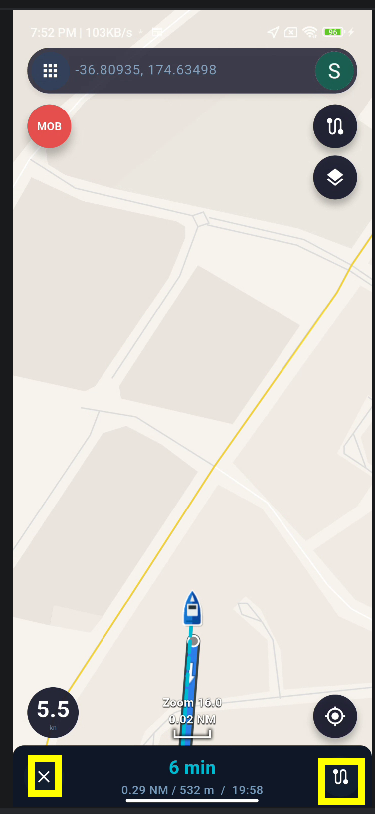
Strange behaviour
If I'm browsing a saved location (not current location) and I press either my location or heading orientation, the map jumps to my current location at a zoom level 17, and the +/- buttons do not work, you have to pinch them screen to change zoom level
zoom level 17 is far to much, and I find myself looking at location marker in the middle of empty screen
For me zoom level 12 is fine, may not work for others.
Is there a way to set a default zoom level or at least keep the previous zoom level when changing?
Thank you for the feedback.
I think you may be using Navigation Mode when this happens. In Navigation Mode, the map automatically adjusts the zoom level based on your current speed, so pressing the location or heading button may return the map to your current position and change the zoom level automatically.
If you would like to browse a saved location freely and keep control of the zoom level, please exit Navigation Mode first, and then browse the map normally.
The map zoom level is automatically adjusted based on your current speed in Navigation Mode:
0–<1 m/s: Zoom 17
1–<3 m/s: Zoom 16
3–<5 m/s: Zoom 15
5–<8 m/s: Zoom 14
8–<15 m/s: Zoom 13
≥15 m/s: Zoom 12
So, the faster you are moving, the further out the map will automatically zoom.
I’ve realized that the + / − zoom buttons are not behaving correctly in Navigation Mode. This will be fixed in the next version.
In Navigation Mode, the + / − zoom buttons should respond correctly and be treated the same as a manual touch gesture on the map.
Pressing the + or − button should immediately change the zoom level, just like manually pinching the screen.
You can exit Navigation Mode by tapping the close button at the bottom of the screen.
Alternatively, you can tap the Route Overview button on the right-hand side to display the full route overview.
 SEA CHART