Feature request zoom buttons
Thank you for an excellent app
I'm coming from Osmand and I miss some features.
I'm going to post each request separately as you request
1- Add zoom buttons to the main screen (+ and -)
Thanks in advance
Thank you very much for your suggestion!
We will definitely consider adding zoom (+ / -) buttons to the main screen.
One concern at the moment is that, especially in landscape mode on smaller phones, adding more buttons to the right side could make the controls too crowded or even cause them to overlap.
I am currently planning to add an interface settings option that will allow users to choose which on-screen controls they want to show or hide. This may give us a better way to add the zoom buttons without making the screen too cluttered.
Thanks again for the helpful feedback!
Thank you again for your suggestion.
This feature has now been implemented in version 2.2.6.
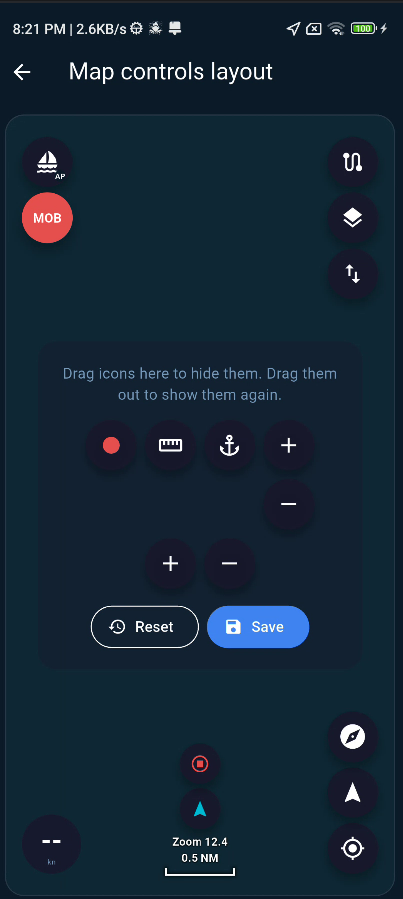
As shown in the screenshot, I have added a new visual interface editor in the Settings menu. You can now customize the main screen by dragging the controls you want — including the + and − zoom buttons — onto the map interface.
Please note that portrait and landscape modes use separate layout templates, so you can customize each orientation independently.
Version 2.2.6 will be released today. Google Play review usually takes around one day, so it should be available to download from the Beta channel tomorrow.
Thank you for helping make the app better!
Customizer screen is an excellent idea
I am so looking forward to the new version.
If I may add another request. In settings, add the ability to set the default zoom level when opening the app for both landscape and portrait modes
Thank you again and wishing you a lovely day
I downloaded version 2.2.6
The layout editor is there but not working for me
I dragged the buttons to the main screen but they don't stay, they just jump back to the hidden area?
Am I doing something wrong?
I found that the drop area is too small on certain screen resolutions. I’ll fix this in version 2.2.8.
I suggest holding the icon briefly over the desired position in this version. Once it is in the right place, it should drop correctly.
Thank you for letting me know.
I have submitted a fix for this issue in version 2.2.7. The drag-and-drop area has been adjusted, so hopefully the layout editor will work properly on both your phone and tablet after the update.
Please let me know how it works for you once you have tried version 2.2.7.
 SEA CHART